KLapper Word Add-In That Thinks Like Your Best Associate
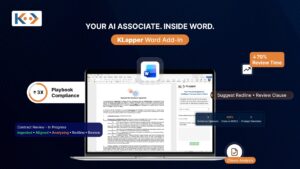
KLapper Word Add-In delivers private, context-aware AI directly inside the environment attorneys already inhabit, turning every document into a live conversation with the firm's own knowledge.
For decades, the contract review workflow inside law firms has been a study in organised inefficiency. Attorneys toggle between Word documents, PDF playbooks, shared drives, and external AI portals — copy-pasting, re-uploading, re-prompting, and still hoping nothing slips through. KLapper changes the architecture entirely. Its Microsoft Word Add-In brings private, firm-grounded AI intelligence inside the document itself, where the work actually happens.
The Inconvenient Truth about Legal AI Today
Most AI tools handed to attorneys today share a structural flaw: they exist outside the document. An attorney must leave Word, navigate to a portal, upload the contract, wait for analysis, interpret the output, then manually apply changes back in the original file. Every step introduces friction, version risk, and the uncomfortable question: where did my client’s confidential document just go?
The consequence is predictable. Attorneys abandon the tool after the novelty wears off. Adoption numbers disappoint. The firm has invested in technology that sits unused while partners continue to review contracts the same way they did in 2005.
The problem was never whether AI was intelligent enough to assist attorneys. The problem was always that it was installed in the wrong place.
What the KLapper Word Add-In Actually Does
The KLapper Add-In is not a chatbot bolted onto a toolbar. It is a contextual intelligence layer that understands the document currently open, the firm’s approved playbooks and standards, and the specific clause-level intent of every paragraph — simultaneously.
Reviewing Contracts against Firm Playbooks
The most time-intensive task in any transactional practice is not drafting — it is the careful, clause-by-clause comparison of a counterparty’s paper against the firm’s preferred positions. This is where junior attorneys spend hours and where senior attorneys catch things juniors miss at 11pm the night before signing.
KLapper changes this calculus. When an attorney opens a counterparty contract, the Add-In has already loaded the firm’s relevant playbook as authoritative context. It knows your firm’s fallback position on limitation of liability. It knows which IP assignment language is non-negotiable. It knows the indemnification structure the partnership approved last quarter.
The Five-Step Review Workflow
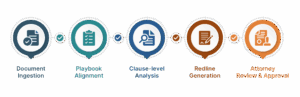
Document Ingestion
The Add-In reads the open document directly inside Word. No upload. No copy-paste. The full document text and structure are available to the AI in real time.
Playbook Alignment
Firm playbooks stored securely in your Microsoft 365 environment are used as grounding context. The AI reasons against your standards, not public averages.
Clause-Level Analysis
Every substantive clause is evaluated individually. Deviations are flagged with severity ratings. Missing clauses are identified. Ambiguous language is surfaced.
Redline Generation
Proposed changes appear as tracked revisions in the document, each accompanied by a rationale drawn from the playbook. Every red mark is explainable.
Attorney Review & Approval
The attorney reviews, accepts, rejects, or modifies suggestions - remaining the final decision-maker throughout. The AI assists; the attorney controls.
Why this matters
Traditional review tools produce a report you read, then act on. KLapper produces changes inside the document you are already editing. The loop between analysis and action collapses from hours to minutes.
Drafting with Precision, Not Prompts
There is a meaningful difference between asking a general-purpose AI to “draft an indemnification clause” and asking KLapper to do the same thing. The general-purpose model writes something that sounds correct. KLapper writes something that reflects your firm’s approved position, preferred language, and risk appetite — because your approved templates and boilerplate are woven into its context.
Attorneys can invoke drafting assistance at the clause level or at the document level. The Add-In surfaces the approved language. Working on a SaaS agreement but your template only covers enterprise software? KLapper adapts intelligently from the nearest analogous standard, flags the adaptation, and invites review.
Drafting Capabilities in Practice
- Generate full contract sections from a plain-language instruction, grounded in approved templates
- Insert firm-standard boilerplate (notices, governing law, dispute resolution) with a single command
- Refine existing language — tighten, expand, simplify, or harden a clause without losing its legal intent
- Adapt precedents from related matter types with explicit flagging of all departures
- Generate clause alternatives at different risk levels: standard, aggressive, fallback
- Produce drafting rationale for client-facing explanations or negotiation memos
Private by Architecture
Confidentiality is not a feature of KLapper’s Word Add-In. It is the foundation on which every other feature is built. Client documents processed through the Add-In never leave the firm’s Microsoft 365 environment. There are no third-party servers involved in inference. There is no shared model that learns from client data. There are no uploads to external portals.
This matters enormously for law firms. Bar association ethics rules and client confidentiality obligations create real exposure when attorney work product or client information flows through public AI services. KLapper eliminates this exposure entirely — not through policy promises, but through architecture.
KLapper vs. The Alternatives
The legal technology market is not short on AI contract tools. What distinguishes KLapper is not any single capability — it is the integration of all capabilities inside Word, grounded in firm-specific context, with no privacy compromise.
| Capability | KLapper Add-In | Generic AI Portals | Standalone Review Tools |
|---|---|---|---|
| Works inside Microsoft Word | ✓ Native | ✗ External | ✗ External |
| Grounded in firm playbooks | ✓ Always | ✗ Generic | Partial |
| Document stays private in M365 | ✓ By architecture | ✗ Uploaded externally | ✗ Uploaded externally |
| Clause-level recommendations | ✓ With rationale | Document-level only | Flags only, no drafting |
| Supports review AND drafting | ✓ Unified workflow | Drafting only | Review only |
| Explainable redlines | ✓ Rationale attached | ✗ No provenance | Partial |
| No prompt engineering needed | ✓ Contextual | ✗ Prompt-dependent | ✓ |
The Scalable, Defensible Contract Workflow
KLapper’s design philosophy is captured in three words the firm can actually stand behind: accurate, defensible, and scalable.
Accurate
Accuracy in legal AI is not about the model being generally smart. It is about the model being specifically right - for your firm's positions, your deal type, your jurisdiction, your client risk tolerance. KLapper achieves this by making the firm's own knowledge the primary context, not a secondary reference.
Defensible
Every output from KLapper carries provenance. When a redline is generated, the Add-In can cite the playbook clause it derived from. When a risk is flagged, the basis is the firm's stated position, not a hidden system. This creates an audit trail that partners, clients, and courts can follow.
Scalable
A first-year associate using KLapper can review a 60-page supply agreement with the same playbook fidelity as a fifteen-year partner. The firm's standards are encoded in the system, not distributed unevenly across individual experience. This is what genuine scalability looks like in legal practice.
Why Attorneys Actually Use It
The graveyard of legal technology is filled with tools that were technically impressive and practically ignored. The pattern is almost always the same: the tool asks attorneys to change how they work. Attorneys, under deadline pressure and billable-hour economics, refuse.
KLapper does not ask attorneys to change how they work. It asks Microsoft Word to get smarter. The interface is already familiar. The document workflow is identical. The only thing that changes is that the attorney now has a contextual intelligence layer available on demand, inside the same application they would have had open anyway.
This is not a minor UX consideration. It is the central reason KLapper sees adoption where other tools see abandonment. When AI is embedded in the workflow, it becomes part of the work. When it requires a detour, it becomes an interruption.
The highest-performing legal AI tool is not the most intelligent one. It is the one attorneys actually open - and KLapper lives inside the document they were already opening.
The Future of Contract Work Lives in the Document
The contract workflow of the next decade will not be defined by which AI portal firms subscribe to. It will be defined by which firms have successfully embedded intelligence into the work itself — into the documents, the playbooks, the clause libraries, and the muscle memory of the attorneys doing the work.
KLapper’s Word Add-In is that embedding. It is Microsoft Word that has read every playbook, learned every standard position, and is now sitting beside every attorney on every contract, silently doing the work that used to take a second pair of eyes and another billable hour.
For firms serious about building a more accurate, defensible, and scalable contract practice — without compromising client confidentiality or disrupting attorney workflow — the conversation starts here.
With KLapper, attorneys draft faster, respond with more confidence, and manage conversations with unprecedented ease.